3x-ui project: https://github.com/MHSanaei/3x-ui
3x-ui is a modified version of x-ui that continues to update the core, supports new protocols, and multi-user management. One of its practical features is the ability to modify the xray core. In terms of visual design and animation smoothness, 3x-ui stands out from other proxy panels.

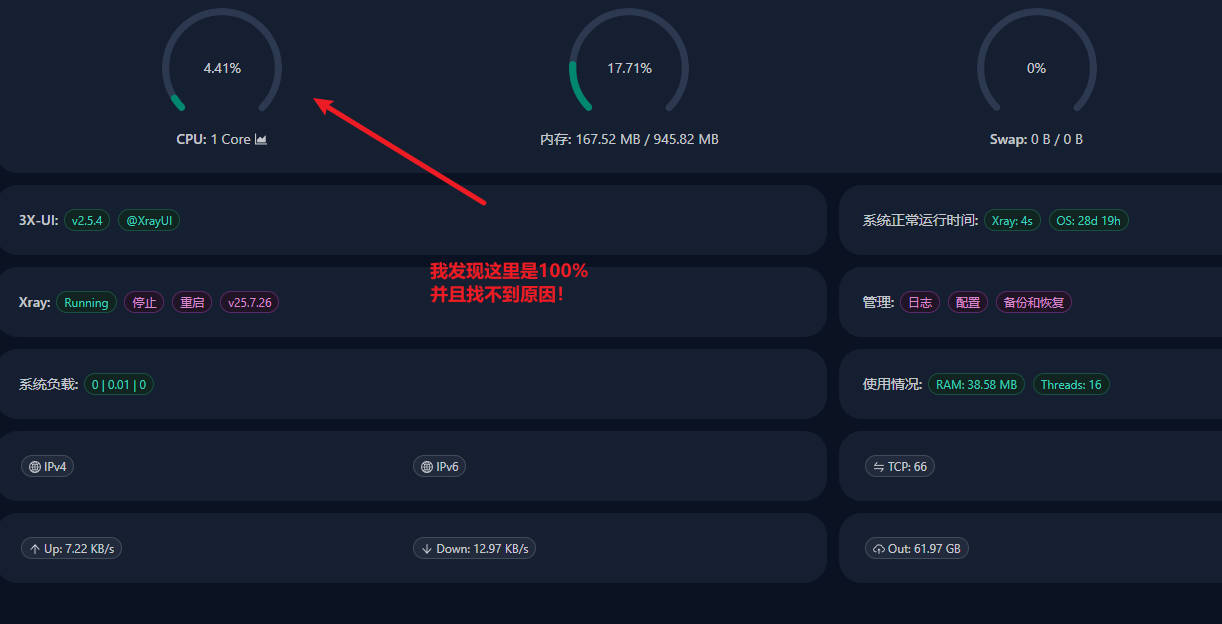
Some time ago, a high-risk vulnerability in 3x-ui was disclosed, and many servers were compromised. My server was infected and had a mining service installed. Using the terminal software FinalShell, I noticed that CPU usage was constantly at 100% when logging into 3x-ui.
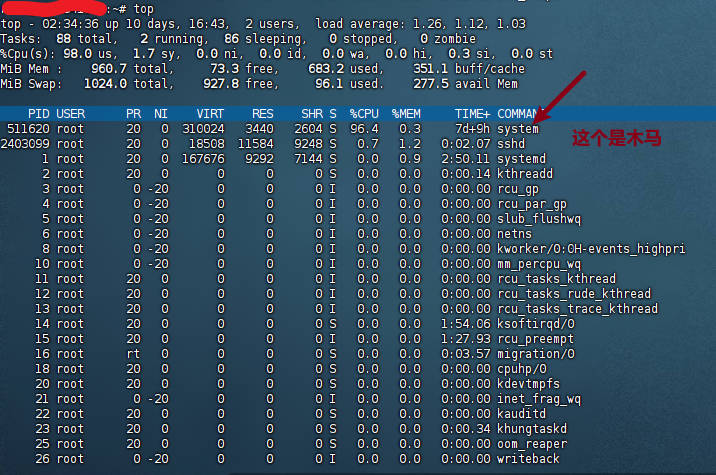
Running the top command revealed a process consuming 96.4% CPU named system. On a normal Debian server the system process is usually named systemd, which raised suspicion.
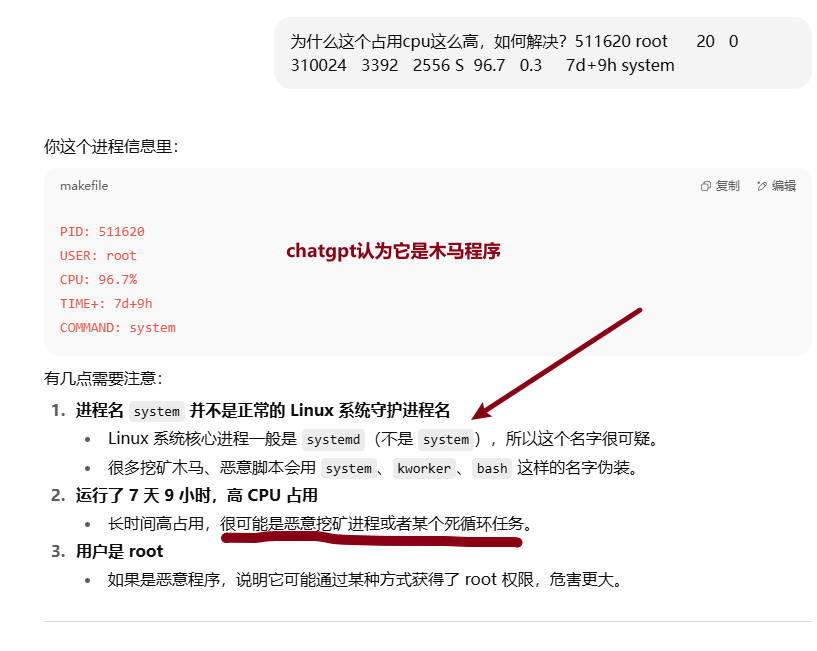
I then consulted ChatGPT with the problem.
| VPS Provider | Lowest Price | Features | Payment Methods |
|---|---|---|---|
| BWG Bandwagon | $49.99/year | Fastest and most stable | WeChat, Alipay, PayPal, Credit Card |
| DMIT | $36.9/year | CN2 GIA, Hong Kong CMI | Alipay, PayPal, Credit Card |
| hostdare | $16/year | High traffic, fast CMI | Alipay, PayPal, Credit Card |
| BuyVM | ¥18 | Large disk, unlimited traffic, streaming unlock | Alipay, PayPal, Credit Card, Crypto |
| RackNerd | $8.89/year | Cheap, high traffic, high specs | Alipay, PayPal, Credit Card, Crypto |
| CloudCone | $13.99/month | Cheap, high traffic, large disk | Alipay, PayPal, Credit Card |
| Vultr | $5/month | Dozens of global locations, $100 credit on signup | Alipay, PayPal, Crypto |
Below is the approximate handling process provided by ChatGPT:
Process information:
PID: 511620
USER: root
CPU: 96.7%
TIME+: 7d+9h
COMMAND: system
Key observations:
-
The process name
systemis not a normal Linux system daemon name- Core Linux processes are usually named
systemd(notsystem), so this name is highly suspicious. - Many mining trojans and malicious scripts disguise themselves with names like
system,kworker, orbash.
- Core Linux processes are usually named
-
Running for 7 days 9 hours with high CPU usage
- Long-term high CPU usage is often a sign of a malicious mining process or an infinite loop.
-
Running as root
- If it is malicious, it has obtained root privileges, making the impact more severe.
First, identify what it is #
Run:
ps -fp 511620
to see the full path and startup command.
Then:
ls -l /proc/511620/exe
to locate the executable.
To check network connections:
netstat -pantu | grep 511620
or:
ss -pantu | grep 511620
If confirmed as a malicious process #
- Kill it immediately
kill -9 511620
- Delete its files
If/proc/511620/exestill points to an existing file:
rm -f /path/to/file
- Clean startup items
Check cron jobs and auto-start services:
crontab -l
ls /etc/cron* -R
cat /etc/rc.local
systemctl list-unit-files | grep enabled
- Check for suspicious users
cat /etc/passwd | grep -v '/nologin'
Prevent reinfection #
- Update the system:
apt update && apt upgrade -y
- Change the root password:
passwd
- Disable root remote SSH login (edit
/etc/ssh/sshd_config, setPermitRootLogin no, thensystemctl restart ssh). - Install fail2ban or other anti-brute-force tools.
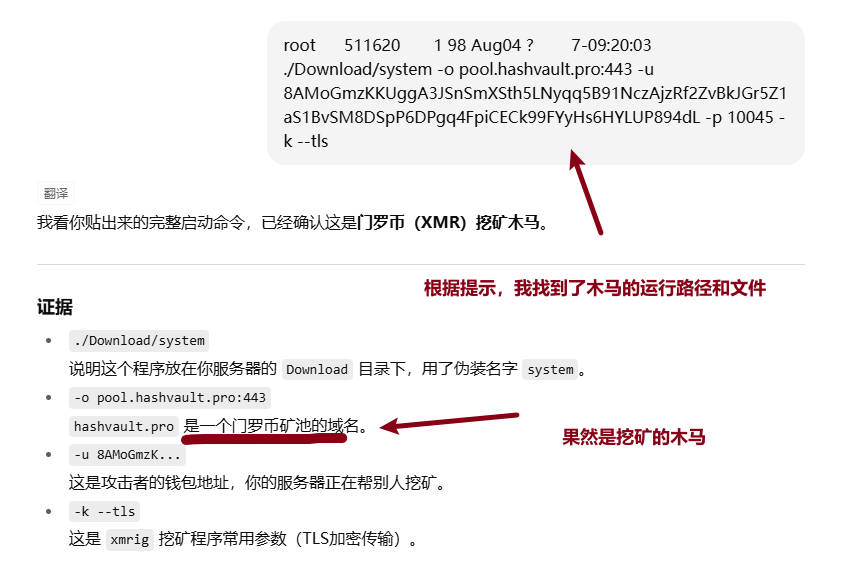
I suspected the system process was a mining trojan. Following ChatGPT’s guidance, I confirmed it was a Monero mining program disguised as a system process.
Further cleanup steps:
Evidence #
./Download/system: The program was placed in theDownloaddirectory with the disguised namesystem.-o pool.hashvault.pro:443:hashvault.prois a Monero mining pool domain.-u 8AMoGmzK...: This is the attacker’s wallet address; the server was mining for someone else.-k --tls: Common parameters used by thexmrigmining program (TLS encrypted transmission).
Actions to take #
1. Kill the process immediately #
kill -9 511620
2. Delete the mining program #
rm -f /root/Download/system
If unsure of the directory:
ls -l /root/Download
3. Search for similar files (to prevent leftover copies) #
find / -type f -name "system" -o -name "xmrig" 2>/dev/null
4. Check startup items (to prevent restart) #
crontab -l
ls -l /etc/cron* /var/spool/cron* 2>/dev/null
grep -r "Download/system" /etc/ 2>/dev/null
5. Check suspicious services #
systemctl list-units --type=service | grep system
6. Change password to prevent reinfection #
passwd
Also recommend disabling root remote SSH login. Edit:
nano /etc/ssh/sshd_config
Change to:
PermitRootLogin no
Then:
systemctl restart ssh
Deeper investigation when the trojan is well hidden #
In many cases the trojan is placed in the user’s own crontab or in a systemd service.
1. Check root user’s crontab #
crontab -l -u root
If it contains commands executing Download/system or xmrig, delete them. Edit with:
crontab -e -u root
2. Search all cron files for mining commands #
grep -r "Download/system" /etc/cron* /var/spool/cron* 2>/dev/null
3. Check systemd auto-start services #
Many miners disguise themselves as system-update.service, network.service, etc.:
systemctl list-unit-files --type=service | grep enabled
systemctl status system
systemctl status system-update
If any point to Download/system or an unknown directory, disable and delete them:
systemctl disable --now servicename
rm -f /etc/systemd/system/servicename
systemctl daemon-reload
4. Check rc.local and startup scripts
#
cat /etc/rc.local
ls -l /etc/init.d/
grep -r "Download/system" /etc/init.d/
5. Prevent reinfection #
- Change password:
passwd - Disable root SSH login (edit
/etc/ssh/sshd_config, setPermitRootLogin no) - Allow only key-based login (
PasswordAuthentication no) - Install Fail2ban for SSH brute-force protection:
apt install fail2ban -y
Actual crontab trojan found #
The first line of crontab was the trojan’s scheduled task:
* * * * * pgrep -x ibus || exec /root/.cache/ibus/ibus &
Meaning:
- Every minute check whether a process named
ibusis running - If not, execute
/root/.cache/ibus/ibus(actually the mining trojan disguised as the ibus input method) - Even if you kill the process, it will restart within one minute
The second line (~/.acme.sh/acme.sh --cron) is a normal certificate renewal task and is not malicious.
Cleanup steps #
- Delete the trojan cron job
crontab -e -u root
Remove this line:
* * * * * pgrep -x ibus || exec /root/.cache/ibus/ibus &
Save and exit.
- Kill the running trojan process
pkill -f "/root/.cache/ibus/ibus"
- Delete the trojan files
rm -rf /root/.cache/ibus
- Check whether systemd has a related service
systemctl list-unit-files --type=service | grep ibus
systemctl status ibus
If an abnormal ibus service is found:
systemctl disable --now ibus
rm -f /etc/systemd/system/ibus.service
systemctl daemon-reload
Finally, remove any remaining daemons/management tasks, change the administrator password, and reboot the server.